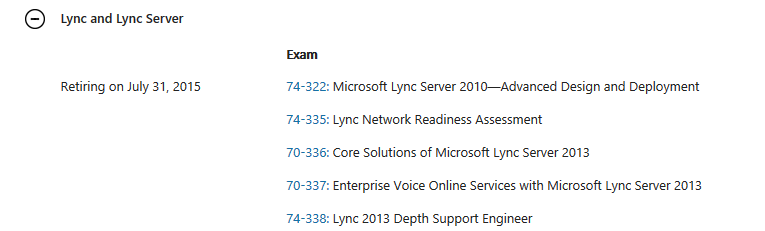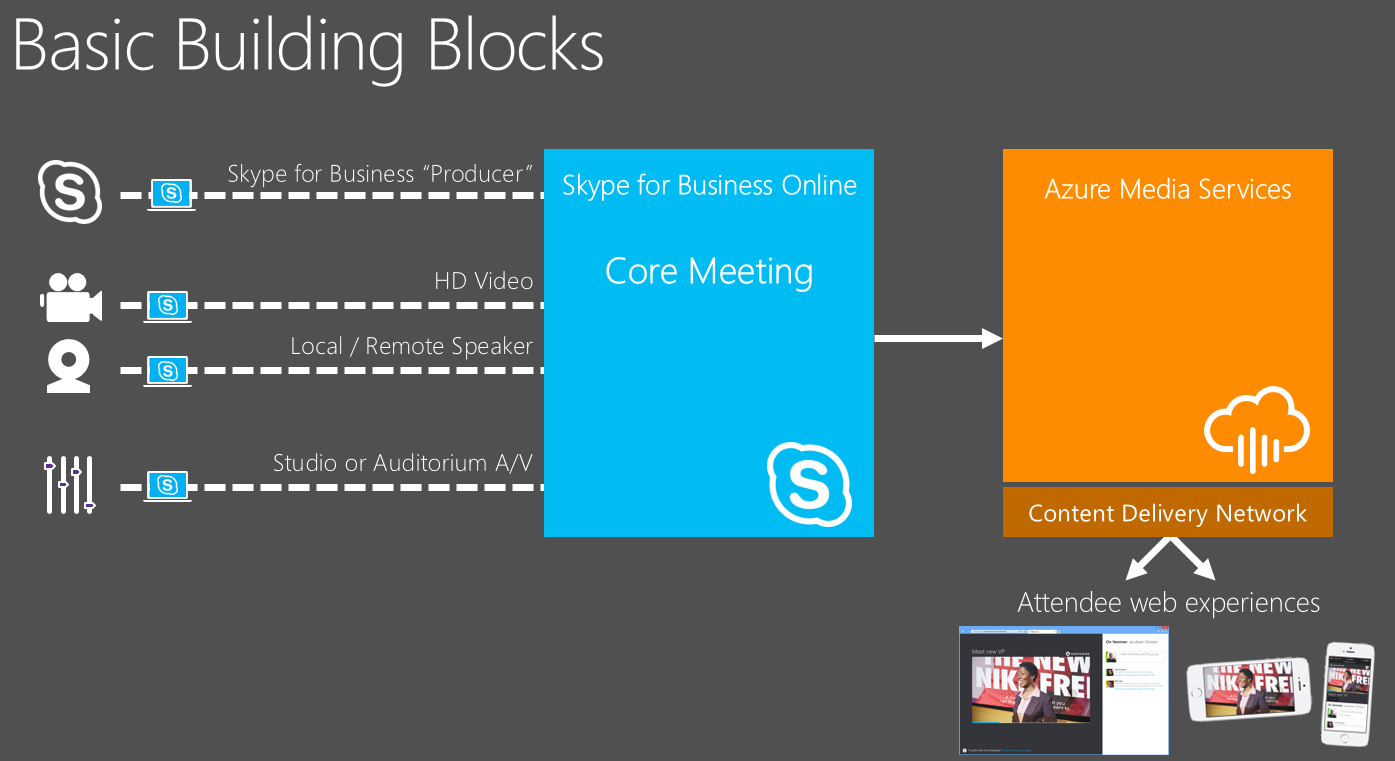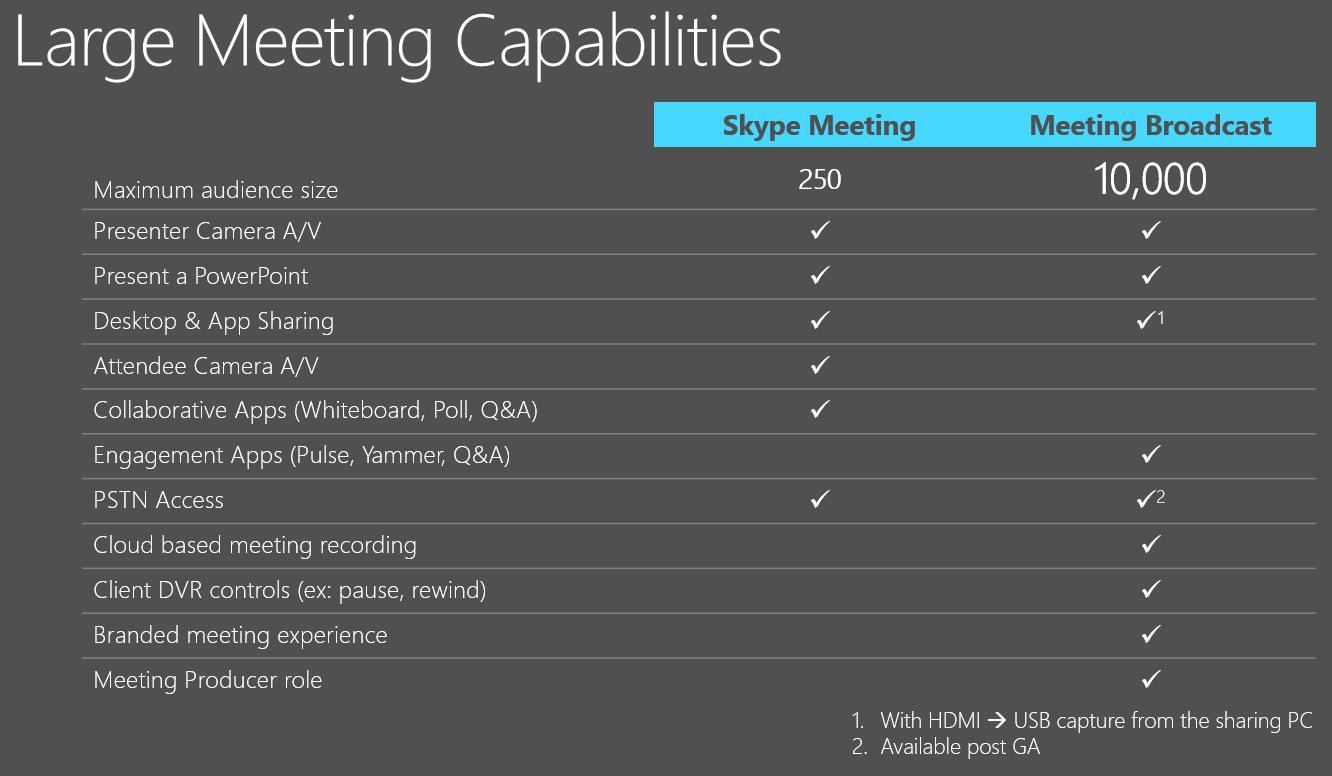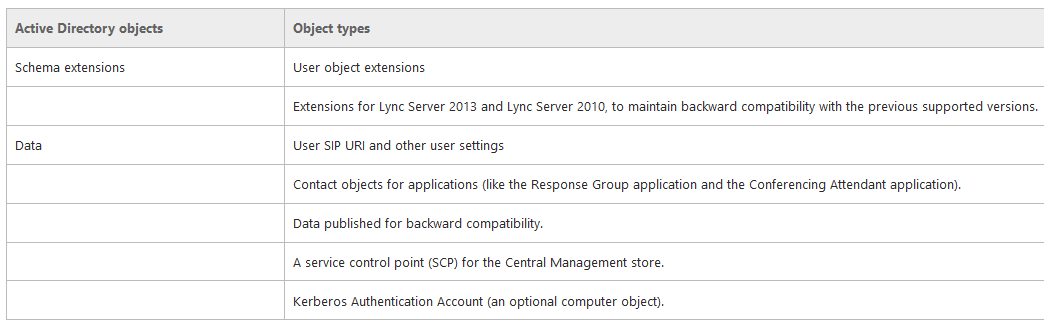
Vous pouvez télécharger les présentations des techdays 2015.
Pour Lync/Skype:
Pour Office365:
Vous pouvez télécharger les présentations des techdays 2015.
Pour Lync/Skype:
Pour Office365:
Microsoft vient de publier une mise a jour pour Lync Serveur 2013.
Version: 5.0.8308.871
Publication: Février 2015
KB:
Correctifs:
Vous pouvez télécharger l'ensemble de ces mises a jours ici: http://www.microsoft.com/en-us/download/details.aspx?id=36820
Procédure d'installation de ces mises a jours ici: http://microsofttouch.fr/default/b/christophe/archive/2014/11/17/microsoft-lync-server-2013-installer-une-cumulative-update
Vous pouvez télécharger la presentation "Ensuring Media Quality in the Network" ici:
Skype4B: Ensuring Media Quality in the Network: summit.office.com/Media/Default/Office%20365%20Summits/ITP32%20-%20Ensuring%20Media%20Quality%20in%20the%20Network_v04-1.pptx
Skype for Business est une nouvelle version très attendue. Pour l'instant, cette release est annoncée pour une disponibilité quelque part dans le premier semestre 2015, aucune date fixe est connue a ce jour.
Skype for Business est le successeur de Microsoft Lync Serveur 2013.
Officiellement, lors du premier summit Office365 de cet année, Microsoft a commencé a lever le voile concernant les nouvelles fonctionnalités, les améliorations et l'architecture.
Quoi de neuf pour la partie architecture et design?
Vous pouvez télécharger la présentation du summit ici:
Skype4B: Reference Architectures and Design: summit.office.com/Media/Default/Office%20365%20Summits/ITP28%20-%20Skype%20for%20Business%20-%20Architecture%20and%20Design%20Considerations-1.pptx
Skype for Business est une nouvelle version très attendue. Pour l'instant, cette release est annoncée pour une disponibilité quelque part dans le premier semestre 2015, aucune date fixe est connue a ce jour.
Skype for Business est le successeur de Microsoft Lync Serveur 2013.
Officiellement, lors du premier summit Office365 de cet année, Microsoft a commencé a lever le voile concernant les nouvelles fonctionnalités, les améliorations et l'architecture.
Quoi de neuf pour les nouvelles fonctionnalités pour la partie serveur et voice?
Vous pouvez télécharger la présentation du summit ici:
Skype4B: Server core and voice improvements: summit.office.com/Media/Default/Office%20365%20Summits/ITP31%20-%20Server_Core_and_Voice_Improvements_v04.pptx
Skype for Business est une nouvelle version très attendue. Pour l'instant, cette release est annoncée pour une disponibilité quelque part dans le premier semestre 2015, aucune date fixe est connue a ce jour.
Skype for Business est le successeur de Microsoft Lync Serveur 2013.
Officiellement, lors du premier summit Office365 de cet année, Microsoft a commencé a lever le voile concernant les nouvelles fonctionnalités, les améliorations et l'architecture.
Quoi de neuf pour les nouvelles fonctionnalités pour la partie service et mise à jour?
Vous pouvez télécharger la présentation du summit ici:
Skype4B: Upgrading To Skype4B: http://summit.office.com/Media/Default/Office%20365%20Summits/ITP29%20-%20Servicing%20the%20Existing%20Deployment%20&%20Upgrading%20to%20Skype%20for%20Business%20Server_v04.pptx
Skype for Business est une nouvelle version très attendue. Pour l'instant, cette release est annoncée pour une disponibilité quelque part dans le premier semestre 2015, aucune date fixe est connue a ce jour.
Skype for Business est le successeur de Microsoft Lync Serveur 2013.
Officiellement, lors du premier summit Office365 de cet année, Microsoft a commencé a lever le voile concernant les nouvelles fonctionnalités, les améliorations et l'architecture.
Quoi de neuf pour les nouvelles fonctionnalités pour la partie réunion et vidéo?
Vous pouvez télécharger la présentation du summit ici:
Skype4B: New Meeting and Video Investment: summit.office.com/Media/Default/Office%20365%20Summits/ITP30%20-%20New%20Meeting%20and%20Video%20Investments_v04-1.pptx
Vous pouvez administrer Lync Online en powershell directement depuis votre poste de travail.
Pour cela, vous devez télécharger les deux composants suivants:
The Lync Online Connector Module: http://www.microsoft.com/en-gb/download/details.aspx?id=39366
The Microsoft Online Services Sign-In Assistant: http://www.microsoft.com/en-us/download/details.aspx?id=28177
Installation Lync Online Connector Module:
Installation Microsoft Online Services Sign-In Assistant:
Lancer votre powershell:
Import-Module LyncOnlineConnector
$session = New-CsOnlineSession -Credential (Get-Credential)
Préciser vos identifiants d'administration de votre tenant.
Import-PSSession $session -AllowClobber
Vous êtes maintenant connecté a votre tenant Lync Online.
Dans les environnements hybrides dans le cadre d'une intégration téléphonique (exemple, Single Number Reach Cisco avec un RDP faisant sonner l'extension Lync), cela peut être considéré comme une mauvaise expérience par l'utilisateur de se voir systématiquement notifié dans le client Outlook de chaque appel manqué.
Désactivation au niveau global:
Set-CsClientPolicy -EnableCallLogAutoArchiving $false
EnableCallLogAutoArchiving:
Lorsqu’il est défini sur True, les informations concernant les appels entrants et sortants sont automatiquement sauvegardées dans le dossier d’historique de conversation dans Microsoft Outlook. (L’appel proprement dit n’est pas enregistré. Ce qui est enregistré, ce sont les informations comme les participants à l’appel, la durée de l’appel et selon qu’il s’agit d’un appel entrant ou sortant.) Lorsqu’il est défini sur False, les informations ne sont pas sauvegardées dans Outlook.
Désactivation au niveau de l'utilisateur:
Sur le client Lync, aller dans TOOLS - OPTIONS- PERSONAL, et décocher: "Save Call logs in my email conversation history folder"
Microsoft a publié une mise à jour pour le client Lync 2013.
Date: 10 février 2015
Version: KB2920744
Lien KB: http://support.microsoft.com/kb/2920744
Lien (x64): http://www.microsoft.com/en-us/download/details.aspx?id=45835
Lien (x32): http://www.microsoft.com/en-us/download/details.aspx?id=45792
Issues Resolved:
• KB 3032399 Update improves users’ ability to select partial instant messages from conversation history windows in Lync 2013
• KB 3032396 Incorrect conversation window opens when you double-click a contact in Lync 2013
Known Issues:
After you install this update, you may experience the issues that are described in the following Microsoft Knowledge Base articles:
• KB 2898357 Screen readers cannot read aloud keystrokes during a Lync 2013 application or desktop sharing session in Windows
• KB 2932389 Persistent Chat file transfer fails between an external user and an internal user in Lync 2013
Microsoft a publié le 9 février une mise à jour concernant l'interface SDN.
Version: Lync SDN Interface 2.1.1
Date: 9 février 2015
Lien: http://www.microsoft.com/en-us/download/confirmation.aspx?id=44274
Description:
Lync Server 2010 and 2013 provide customers with an unmatched unified communications and collaboration experience. Since Lync relies on the underlying network, sometimes the quality of experience can be affected by underperforming or improperly configured network elements. Applications built on the Lync SDN API provide the ability to quickly detect quality-affecting issues on the network, and deliver prescriptive resolutions and traffic prioritization.
Lync SDN Interface version 2.1.1 provides the following improvements:
- Support for disaster pool failover.
- Limits the number of archived log files to 10 (configurable in the *.exe.config file).
- Provides support for, and integration with, Lync Server vNext.
- Provides replay of SIP logs through LDL.
Microsoft a publié le 6 février des mises à jours pour Microsoft Lync Serveur 2010.
Version: 4.0.7577.710
Date: Février 2015
KB: 2493736
Mise à jour:
http://support2.microsoft.com/kb/3030713
Description:
This cumulative update resolves an issue that is described in the following article:KB 3030729 AVMCUSvc.exe crashes when more than one network adapter is installed in Lync Server 2010 A/V Conferencing Server
Plus d'informations ici: http://support.microsoft.com/kb/2493736
Une nouvelle mise à jour de Skype pour iPhone est disponible depuis hier.
Version: 5.10
OS: iPhone
Lien: https://itunes.apple.com/us/app/skype-for-iphone/id304878510?mt=8&ign-mpt=uo%3D2
Nouveautés:
- Improved chat notification reliability - we are continuing to work on improving reliability but if you encounter issues please let us know by tapping your profile picture, tapping the more button and selecting send feedback
- Now save phone numbers entered into the dial pad and numbers in the recent calls list
- General Improvements
Description disponible ici: http://blogs.skype.com/2015/02/09/skype-5-10-for-iphone-bringing-back-uri-support/
Avec la version 7.0, AudioCodes Element Management System (EMS) est capable aussi d'assurer la surveillance opérationnelle de la gamme de téléphone 400HD.
AudioCodes Element Management System (EMS):
The AudioCodes’ Element Management System (EMS) is an advanced solution for centralized, standards-based management of AudioCodes’ One Voice™ product portfolio:
AudioCodes’ EMS covers all aspects of efficient operation, administration, management and provisioning (OAM&P) of these voice network products. AudioCodes’ EMS enables service providers, hosted services and large enterprises deploying Unified Communications (UC) networks to cost-effectively manage their voice network throughout its complete life cycle.
Information ici:
http://blog.lyncmigration.com/2015/02/managed-ip-phones---bringing-order-to-the-desktop.html
http://www.audiocodes.com/products/ems

Cisco a annoncé la disponibilité il y a quelques jours de la version 10.6 de Jabber pour Windows, Mac, IOS et Android.
Nouvelles fonctionnalités:
Chat and Presence
Alert When Available - Set your client to notify you when a contact becomes available. Right-click over the user's name to select the Alert When Available option. You are notified the first time the user next becomes available. A message notification is displayed on the top-right corner of your screen to alert you that the user is available.
Locations - Create, define, and display your location in your client for your contacts to see. Configure the Locations feature using the Location_Enabled parameter, and users can define their settings in the Options menu.
Spell Check - For Windows 7 and Windows 8, you can define a default language from the Options menu. From the chat window with another user, you can personalize the language for chats with that user that is different from the default language in your client.
Print Chat - You can print a conversation with a right-click from a chat window with another user or by pressing CTRL + P. You can also highlight a portion of the text to print it.
AutoSave Chat - From the Options menu, you can automatically save chats to your computer when you close a chat window. Once the chats are saved to your computer, search the chat files or use your Windows file search capability to search the chat files. You can save peer-to-peer and group chat conversations. This feature is off by default.
Client Behavior at Start Up - By default, the client opens in a minimized state. However, you can configure the client to open in the same state that it was in when you last closed it. For example, if you last exited the client with the Jabber window open, then the next time you start Jabber, the window is opened. You set the HonourLastWindowState parameter to true. The option to Start Cisco Jabber when my computer starts must be enabled by the user for the parameter to take effect.
Remove Group Chat Participants - The person who starts a group chat can now also remove group chat participants. Removed chat participants can be re-invited to the chat room at any time.
Conversation Tab Reordering - You can drag and drop any kind of tab in your conversation window to put them in your preferred order. You can drag and drop tabs from person to person chat, group chat, and persistent chat room conversations. You can also drag and drop tabs from persistent chat room searches and filters, and all types of call tabs for audio and video.
Conversation Tab Switching Shortcut - You can move between chat tabs by using CTRL+TAB keyboard navigation, or use CTRL+SHIFT+TAB to move up and down between tabs for each conversation.
Chat Security Labels - Label chats with security labels are now available, such as "secret" or "top secret", or your company can create its own labels. Compliant with the XEP-256 standard.
Passwords for Persistent Chat Rooms (on-premises deployments only) - Persistent chat room administrators can restrict access to rooms by adding passwords to them.
Save Chat History to Outlook Folder - Enable saving chat history automatically in a Microsoft Outlook folder. This feature is off by default. Prerequisites: Microsoft Exchange 2010 or 2013.
Sharing
Share Menu - A new menu is available from chat windows to share your screen and start instant WebEx meetings. To access these options, select the More button from the conversation window.
Size Limit for File Transfers - Define a file size limit for Cisco Jabber users when transferring files.
File Transfer enhancements (on-premises deployments only, prerequisite: Cisco Unified Communications Manager 10.5(2) ) - In addition to standard file transfer between peers, you can now transfer files in group chats or persistent chat rooms. You can also use this feature to enable file transfer compliance, where you can manage screen captures and file transfers to restrict who can send and receive files, and keep a history of the file transfer and screen captures for auditing purposes.
Voice and Video
Do Not Disturb - Call alerts and ringers are suppressed when your presence is Do Not Disturb, or in any red presence state. If you receive a call while in Do Not Disturb, you still see a missed call notification on your client. However, if you are using a headset with its own ringer, then the call rings is not suppressed on the headset. Both administrators and users can change settings for this feature.
Call Notifications on Other Device - For users who do not want to interrupt their work to answer the phone, you can now disable incoming call alerts, which requires the call to be answered from a desk phone or a headset.
Mute Before Answer - When you are joining a call, you can now mute your phone before you connect to the call.
Audio Device Selection - You can select your preferred headset or other audio device directly from chat windows. A new option allows you to open audio options in the Jabber client, and select your microphone, headset, and ringer preferences.
Ring on All Devices - You can hear incoming Jabber calls and alerts on your computer speakers and all connected devices. Even if your headphones are plugged in, when you receive a Jabber phone call or IM alert, the sound is played in both your headset and through your computer speakers. This feature is enabled by default, but users can change their ringer and alert preferences in the Audio tab of the Options menu.
Call Stats - When on a call, users can now view information about the active call from their File menu, under View > Show call statistics.
Japanese Language
This release includes improved Japanese localization.
User Management
Single Sign On for Expressway for Mobile and Remote Access - You can now use SAML Single Sign On when connecting to the client from outside the corporate firewall on the Expressway for Mobile and Remote Access. Prerequisite: Cisco Expressway VCS-C or VCS-E 8.5(2).
Mandatory Upgrade Support - You can now enable the client to require users to upgrade their client. To set mandatory upgrades for on-premises deployments, you set the Mandatory parameter in the upgrade .xml file to true. If you do not define mandatory upgrades, or you set it to false, then users can choose to install the update. If you set the mandatory parameter to true, then users can only select to install the update or exit the client. This feature is supported in Cisco Jabber for Windows 10.5(2) and later.
Flexible Jabber ID - When setting up Jabber, the Jabber ID (which identifies the Jabber user) can be mapped to the Directory URI field on Cisco Unified Communications Manager. This ID allows Jabber to identify the Jabber user by their AD mail attribute or their AD msRTCSIP-primaryuseraddress attribute. A user can log into Jabber with their sAMAccountName attribute, while the Jabber ID is mapped to the Directory URI field. For more information, see the ID Address Scheme section in the Cisco Jabber 10.6 Deployment and Installation Guide.
Multiple Presence Domains - Also known as Multiple IM Address Domains, Jabber can be deployed into an infrastructure where users are organized into more than one domain, or into domains with subdomains.
US Federal Government Requirements
FIPS 140-2 - You can use Cisco Jabber for Windows in compliance with FIPS (Federal Information Processing Standard, Publication 140-2) to ensure compliance with the standards for information security and encryption. When you set your Operating System to run in FIPS mode, Jabber detects FIPS mode and also runs in it. For more information, see the Security chapter in the Cisco Jabber 10.6 Planning Guide
Release Notes Android: http://www.cisco.com/c/en/us/td/docs/voice_ip_comm/jabber/Android/10_6/rn/JABA_BK_CB805EB4_00_cisco-jabber-for-android-10-6-release_notes.html
Release Notes Windows: http://www.cisco.com/c/en/us/td/docs/voice_ip_comm/jabber/Windows/10_6/rn/JABW_BK_C6A8A6C3_00_cisco-jabber-for-windows-10_6-release-notes.html
Release Notes Mac: http://www.cisco.com/c/en/us/td/docs/voice_ip_comm/jabber/mac/10_6/JABM_BK_C6D012D7_00_cisco-jabber-for-mac-106.html
Release Notes Ios: http://www.cisco.com/c/en/us/td/docs/voice_ip_comm/jabber/iPhone_iPad/10_6/RN/JABI_BK_CF3573C2_00_cisco-jabber-for-iphone-and.html
Une description est accessible directement sur le blog francais de cisco: http://gblogs.cisco.com/fr-collaboration/2015/02/cisco-jabber-10-6-est-disponible-depuis-quelques-jours-sur-le-site-www-cisco-com/
Paul vient de publier un interessant outil de management pour Lync sur le technet.
Download: https://gallery.technet.microsoft.com/Lync-User-Manager-8bbccb79
Description:
The Lync Control panel is great for general user management BUT..
it has limitations. Some of these I come across regularly are as follows:-
Lync User Manager offers a single window to take care of Lync and Unified Messaging Moves, Adds, Changes and Deletions. Add to that the ability to compare users side-by-side AND even match and save to "copy" another users policies.
3. Fill in your AD, Exchange and Lync Server connection details. Remote PS sessions will be fired off to these in the background.
4. Click
and watch the status change from Not Connected to Connected as the different modules are loaded.


5. Once the connection is completed the User panes becomes active. This means we are ready to start managing our Lync users.
NOTE Currently, the AD user needs to already exist. I may include this in vNext based on demand.
1. To add a new Lync user, fill in the user name in the user name box (you could click
to make sure the user doesn't exist).
2. Fill in the user details as you skip through the Personal Attributes, Common Attributes and UM Attributes.
3. Once completed, click
to send the request to the servers. Wait a few seconds and click
followed by
to confirm that the user has been created as expected.
TIP You may have to wait a few seconds for the changes to reflect as they could take a few seconds to be committed.
You could also simply add or remove a Line URI to the Line URI and Private Line URI boxes followed by
to commit.
Type in a PIN in the PIN box, check the Set PIN check box and click
to commit the new PIN
Copy user is perhaps my favorite function. You can use copy both when adding new or when changing an existing user.

TIP If you intend to only delete UM, simply un-check the enabled Box and click
. You will be prompted to confirm
Download
V1.0.0.1 - First release
Only tested against Lync 2013
And of course, this tool can be run remotely (RSAT may be required in some scenarios)
Please let me know of any bugs as well as suggestions.
Skype for Business est une nouvelle version très attendue. Pour l'instant, cette release est annoncée pour une disponibilité quelque part dans le premier semestre 2015, aucune date fixe est connue a ce jour.
Skype for Business est le successeur de Microsoft Lync Serveur 2013.
Officiellement, lors du premier summit Office365 de cet année, Microsoft a commencé a lever le voile concernant les nouvelles fonctionnalités, les améliorations et l'architecture.
Quoi de neuf pour les nouvelles fonctionnalités pour la partie serveur et voix?
Core Server:
Vous pouvez télécharger la présentation du summit ici:
Skype4B: Server Core & Voice Improvement: summit.office.com/Media/Default/Office%20365%20Summits/ITP31%20-%20Server_Core_and_Voice_Improvements_v04.pptx
Source: http://summit.office.com/readiness , mot clé "Skype"
Matt Landis présentera le 4 février une session avec comme sujet les nouvelles fonctionnalités de leur console de réception Lync Attendant Pro.

Join this online event on Wednesday Feb 4, 2015 @ 10AM-11 EST to get an update on advanced new features Attendant Pro for Lync, the attendant console software for Microsoft Lync that is designed for Lync, is a 1 minute install, supports many devices including Lync Phone Edition devices, brings 1-Click efficiency to most voice functions and still gives console operator access to UC features like video & desksharing.
The event will address:
Q&A Time to Answer Your Questions (click here and see FAQ / Getting Started)
Presenter(s):
Wendell Martin, Business Developement Manager Landis Computer
Matt Landis, CEO Landis Computer, Lync MVP

Attendant Pro for Lync http://landiscomputer.com/attendantpro
simple operator console software for Lync 2013
-Modern Look & Feel: Designed for Lync 2013
-Simple to Implement: 1 Minute Install. No Servers
-Broad Device Interoperability: Lync Phone Edition & Lync Optimized Devices Supported.
-Maximize Efficiency: One-Click for common voice handling tasks.
-UC Functionality Not Compromised: Video, DeskSharing, Conferencing avaialble to Attendant user.
Pour vous aider dans la création, l'édition, l'optimisation ou encore la gestion des règles de normalisations Lync/Skype for Business, il existe un outil vraiment très pratique pour vous aider:
Nom: Expresso 3.0
Download: http://www.ultrapico.com/ExpressoDownload.htm
Précisez votre règle et l'outil vous détaille le flux, pratique pour les règles complexes:
Les sessions des Microsoft Ignite se déroulant à Chicago du 4 au 8 décembre sont officiellement annoncés.
Pour la partie Skype for Business, vous pouvez les trouver ici: http://ignite.microsoft.com/Sessions?filter=|P|0eb205d6-1070-e411-b87f-00155d5066d7|/P|#fbid=eKIoZQMFEwn
Les sessions Office365: http://ignite.microsoft.com/Sessions?filter=|P|10b205d6-1070-e411-b87f-00155d5066d7|/P|#fbid=eKIoZQMFEwn
Plus d'information sur l'évenement ici: http://ignite.microsoft.com/#fbid=eKIoZQMFEwn
J'ai la chance de pouvoir participer a cet Ignite, en espérant que cela soit aussi bien que les lync conférences de Vegas.
Le groupe des Usages Communication Unifiée Microsoft de Montréal se réunira le 31 mars 2015.
Cette réunion permettra de faire une introduction de ce nouveau groupe et inclura deux sessions:
- Présentations des nouvelles fonctionnalités Skype for Business dans le cadre d'un déploiement local ou dans Office365
- Présentations des nouveautés en termes d'architecture/processus de déploiement
Une période de question sera prévue en fin de session.
Les sessions seront animées par les deux Microsoft MVP Lync/Skype for Business pour le Québec, Jean-Philippe Breton, Président de Akilon, et Christophe Boucetta, Directeur technique UC de Solulan.
La session est gratuite et accompagnée de boisson, nourriture offerte par le groupe des usages UC de Montréal.
Plus d'informations et inscriptions ici: http://www.meetup.com/Groupe-des-Usages-Communication-Unifiee-Microsoft-Montreal/events/219859980/
Sonus a publié en début de mois (un peu de retard dans mes publications) une nouvelle release pour sa gamme SBC 1000-2000.
Version: 4.1
Lien: https://support.sonus.net/display/UXDOC41/SBC+1000-2000+4.1+Release+Notes
Nouvelles fonctionnalités:
FXS Call Waiting Support
E911: Enable Use of ELIN Numbers In CompanyName Field
Partial Export-Import in User Interface
Dynamic Host Resolution
SIP INVITE Support with Replace
Software Upload Progress Bar
TLS v1.2 Support
Corrections:
|
Bug ID
|
Headline
|
|---|---|
| SYM-18353 | Not responding to SIP UNREGISTER challenge when contact modified |
| SYM-17243 | Alert user when SDP contains SRTP, but SIP signalling has TCP/UDP |
| SYM-18165 | Expand upper limit for call progress tones to 3400 Hz |
| SYM-18279 | Allow video call rerouting upon call failure in Survivable Mode |
| SYM-18380 | Remove SHA384 hardware acceleration |
| SYM-17765 | MediaStreamController memory leak with certain downstream forking |
| SYM-17534 | SBC 1000 main board DSP Ethernet packet switching reliability |
| SYM-17372 | Enhance SIP Server Entry WebUI Dialog |
| SYM-18303 | SIP INVITE without SDP results in no audio |
| SYM-18304 | CAS SG call forward options apply to analog FXS only |
| SYM-17448 | SIP WARNING header not passed through |
| SYM-17950 | G.722.2 to G.729 transcode call audio quality |
| SYM-17417 | Contact Registrant table modification take effect only by removing/adding the table to server |
| SYM-17616 | SIP with DNS-SRV stability improvements |
| SYM-17878 | Improper handling of received FAX mediastream which contains no FAX codec |
| SYM-17365 | Alarm grammar enhancements |
| SYM-17375 | MSC Transcoding and Video Passthrough log enhancements |
| SYM-17299 | Include "transport=" parameter in REGISTER from UX Contact Registrant Table |
| SYM-18113 | Microsoft® Lync Setup Emergency Callback Number format does not allow '+' |
| SYM-18169 | Prevent switch to modem pass-through after T38 is negotiated |
| SYM-18218 | SMM rule for custom header fails parsing if not configured in lower case |
| SYM-18239 | Call Routing table name spelling error generated by Microsoft® Lync wizard |
| SYM-18114 | Decrease delay between Register Requests from 1Sec to 200mSec when not staggering |
| SYM-18168 | Validate Server FQDN not set to a default value |
| SYM-17621 | SBC 2000 management bus access enhancements |
| SYM-18271 | SBA should use static IP during initial setup |
| SYM-18003 | Persistent socket re-use for outgoing call transfer and redirect transaction flows |
| SYM-17308 | Microsoft® Active Directory Server may take longer than 15 seconds to respond |
| SYM-17386 | Suppress erroneous SIP error log message for Music on Hold call flow |
| SYM-17049 | Support CED/CNG relay in T.38 |
| SYM-17353 | REST SIP Server configuration access |
| SYM-17902 | Reject non repudiation certificates at run-time |
| SYM-17952 | Enforce 500ms lower bound for CAS R2 inter-digit timer |
| SYM-17227 | Incorrect transport used to phones registered with TLS |
| SYM-17385 | Ensure refreshed ARP cache for active video call endpoints |
| SYM-17461 | Remove non-alpha numeric characters from AlarmConfiguration.csv |
| SYM-17357 | Save and Restore SSRC for TX audio stream during call transfer |
| SYM-17345 | SIP SG Protocol and Listen Port configuration REST validation |
| SYM-15731 | Eliminate duplicate state change messages for SG and channel state changes |
| SYM-16673 | Handle optiontags in multiple require header lines sent in SIP Messages |
Skype a publié une nouvelle version pour iPhone.
Release: 5.9
Nouveautés:
- Appelez rapidement des contacts et des groupes à partir du nouveau sélecteur (appuyez sur la nouvelle icône de conversation et choisissez votre interlocuteur)
- Numéroteur amélioré qui recherche les contacts Skype dès que vous commencez à saisir un numéro de téléphone
- Améliorations générales
https://itunes.apple.com/fr/app/skype-for-iphone/id304878510?mt=8&ign-mpt=uo%3D2
Suite à l'annonce du support des appels vidéos entre Skype et Lync et temporairement désactivé par la suite, Microsoft a annoncé officiellement espérer la réactivation de ce service a partir du 26 janvier 2015.
Les appels seront donc possible entre un client Lync et un Skype étant en version 7.1 ou supérieur (bientôt disponible).
Informations:
In December 2014, we announced the initial availability of video calling between Skype and Lync in a blog post on the Office Blogs website. In the weeks that followed that initial availability, we discovered several issues in the Skype consumer client versions that were enabled for video calling with Lync. These include at least one issue that could cause the Skype client to crash. Based on the severity of the issues, we disabled video calling for most Skype consumer users while we work on fixing the underlying issues.
Specifically, we're advising the following:
FAQ:
Q1: When and how will we re-enable video calling between Skype and Lync?
A1: We expect to re-enable this functionality no later than the week of January 26, 2015, when we release a new Skype Windows desktop client.
Q2: Regarding Q1, video calling with Lync will be re-enabled by using a new Skype Windows desktop client. How can I check whether I have the correct client?
A2: We will re-enable video calling with Lync or Skype Windows desktop client versions 7.1.xx.xxx and later versions. You can check the Skype version number by following the instructions at What version of Skype am I using on my computer?
Source: http://support2.microsoft.com/kb/3034626/en-us?sd=rss&spid=16924

Share Attendant Pro for Lync: New Features Update - Feb 4, 2015 10-11AM EST
Email Share Tweet