Le Cloud de Christophe BOUCETTA

Voici le blog sur les communications unifiées et la collaboration Microsoft par un MVP nominé depuis 11 ans
  • [Skype for Business] Polycom VVX - Combinaisons de clés multiples

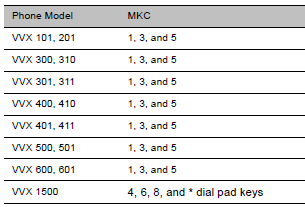
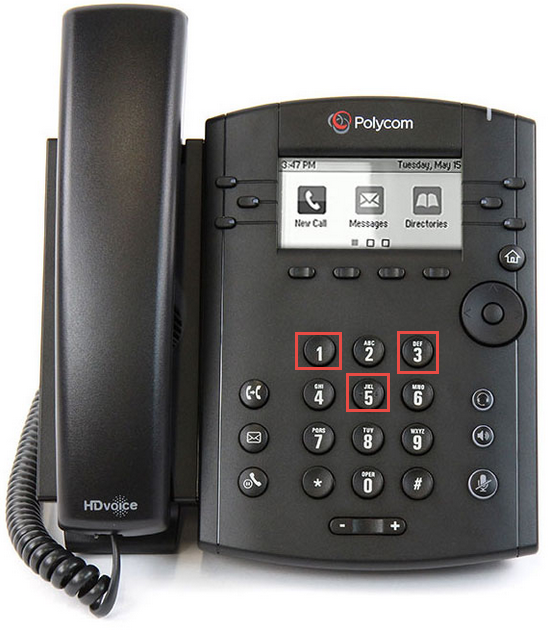
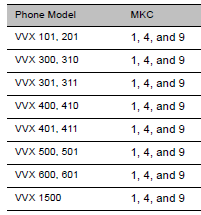
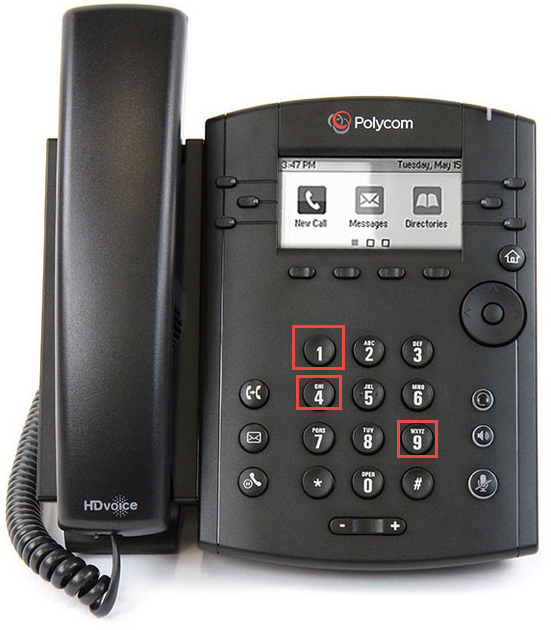
    Les combinaison de touches multiples (MKC) sur vos téléphones Polycom vous permet d'effectuer rapidement les opérations suivantes:

    - Redémarrer le téléphone
    - Réinitialiser le téléphone aux valeurs par défaut
    - télécharger les fichiers journaux depuis votre téléphone vers votre serveur de provisionnement
    - Définir le le profil de base
    - Afficher les détails du téléphone

    Vous devez les composer et maintenir simultanément

    Les combinaisons de touches sont les suivantes:

    - Redémarrer le téléphone:

    Vous devez les composer et maintenir simultanément jusqu'a l'audition d'une tonalité.
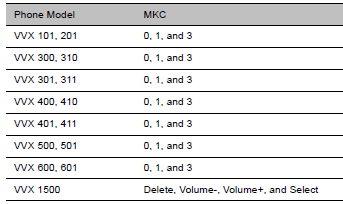
    - Réinitialiser le téléphone aux valeurs par défaut

    Vous devez les composer et maintenir simultanément jusqu'a l'affichage d'un prompt nécessitant de renseigner le mot de passe administrateur.

    - Télécharger les fichiers journaux depuis votre téléphone vers votre serveur de provisionnement:

    Vous devez les composer et maintenir simultanément jusqu'a l'audition d'une tonalité.
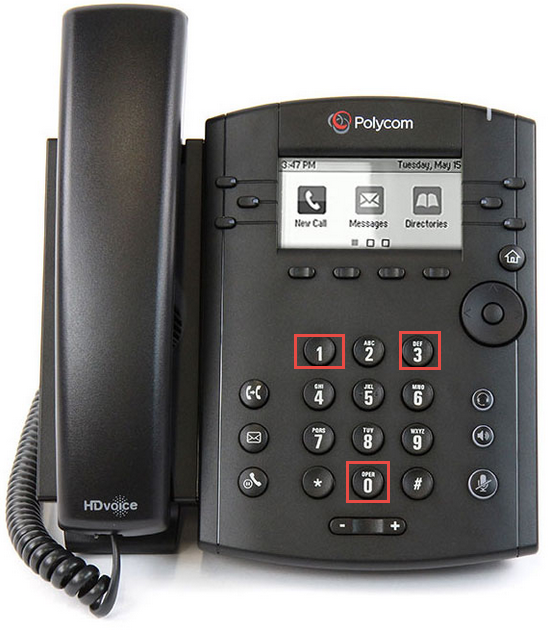
    - Définir le le profil de base:

    Vous devez les composer et maintenir simultanément jusqu'a l'audition d'une tonalité.
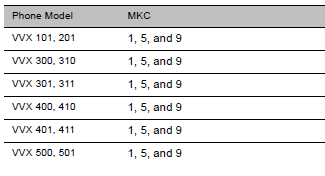
    - Afficher les détails du téléphone :

    Vous devez les composer et maintenir simultanément jusqu'a l'audition d'une tonalité.

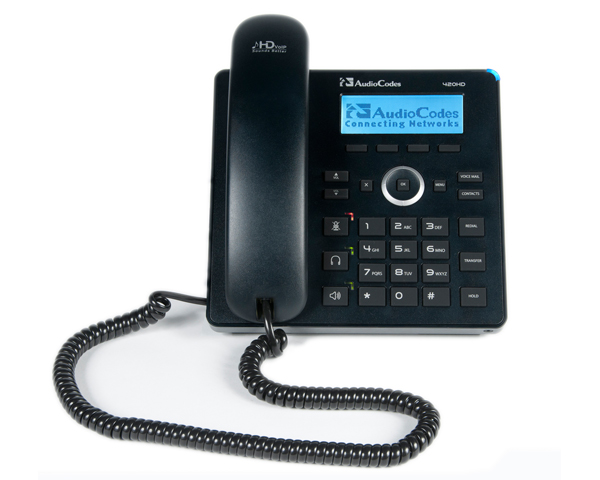
  • [Skype for Business] Téléphones IP Audiocodes HD400 - Firmware 3.0.1

    Audiocodes vient de rendre disponible une mise a niveau

    Audiocodes vient de rendre disponible une mise a niveau des firmwares pour téléphones sur IP en version 3.0.1.

    Les versions sont:

    - 3.0.1.212 (all 400HD Series IP Phones except the 450HD phone)
    - 3.0.1.89.335 (only the 450HD phone)

    Les modèles compatibles et disponibles aux téléchargements sont les HD450, 420, 440 et 430.

    Les nouveautés:

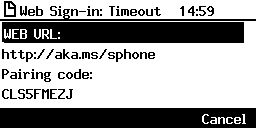
    Cloud PBX Web Sign-in, a.k.a. Device Pairing - connectivity to Microsoft's Cloud PBX: Microsoft's cloud-hosted version of enterprise voice. AudioCodes' IP phone features a sign-in
    option allowing users to connect to Microsoft's Cloud PBX: Web Sign-in.

    Capability to add and delete contacts to/from Skype for Business 'Favorites'. Users can add a person to the Favorites group after (for example) a call with the person is logged. A maximum of 1,000 people can be added to the Favorites group. Users can delete the added person if necessary.

    Join Meeting Enhancement:With this version, users can enjoy a 'join' option for online meetings even if the TNEF option is disabled on Exchange; Exchange enables sharing information between federated parties; by default, the sharing option is disabled (TNEF = disabled); the phone relies on the Join Skype Meeting link in the calendar meeting request. The join link is usually found in the body of a meeting request. However, the phone depends on this link to be present in the MAPI properties of the message. When this meeting request is sent to remote organizations (Skype for Business federated partners), the remote organization’s phone by default will not show the meeting join link in the calendar because Outlook and Microsoft Exchange do not use Transport Neutral Encapsulation Format (TNEF) to package information for sending messages across the Internet. TNEF, which encapsulates MAPI message properties, is by default disabled for messages sent externally from an Exchange organization.

    Secured connection to IP Phone Manager. The connection between the phone and the IP Phone Manager can now be fully secured using HTTPS

    New Boss-Admin experience exclusive to 440HD. Boss and Admin can utilize the 440HD sidecar to present active and held calls in the queue.

    - Admin can see each Boss queue on the sidecar
    - Boss can see all Boss calls in the queue on the sidecar
    - A mix of Admin and Boss can be also used in this mode

    - Users can still use the sidecar for Speed Dial/BLF. The upper sidecar key allows users to switch between BLF and Boss/Admin queues.

    Boss Privacy mode. Conceals a remote caller's ID from the Admin’s (delegate’s) phone in order to protect their Boss's privacy. The feature is disabled by default; the network administrator can enable it. The feature applies to the phone's sidecar and to the Call List in the phone's screen.

    BToE default pairing mode is now automatic. As of this version, the default BToE pairing mode is automatic. Using the manual pairing option requires changing the phone's configuration. The new default pairing mode allows users to derive maximum benefit from the BToE feature.

    450HD phone's idle screen now displays both Function Keys (i.e., Speed Dial/BLF) and Delegates (i.e., delegated users):

    Pause dialing. Pause dialing can be configured for a Speed Dial in order to create a time break, typically needed when configuring a Speed Dial to dial a destination extension number that is behind an Interactive Voice Response (IVR) system.

    Enhanced Visual Voicemail (VVM). The phone updates the MWI LED and the number of messages even if the configuration between Exchange and Skype Online has not been performed correctly. This is relevant to users whose Skype or Exchange is online.

    Users can make new calls during incoming calls. This feature is now supported on all phone models.

    Headset ringer activated on incoming calls. The headset plays a ringer when calls come in, in addition to the phone's ring.

    New language support. Korean is now supported on the 405HD phone.

    Improved debugging. DSP Packet Recording can be enabled on the fly, without requiring the network administrator to reset the phone.

    Ability to change the DTMF level. Network administrators can now change the DTMF level with a new configuration file parameter voip/audio/gain/dtmf_tone_signal_level.

    Improved Common Area phone. The DND (Do not Disturb) key and the Call Forward key were removed from the Common Area phone's menus to prevent Common Area phone users from making the phone 'unavailable'.

    Improvement to the ‘Locking / unlocking a paired phone’ feature. Starting from this release, a paired phone is automatically locked 10 seconds after the PC with which it is paired, is
    locked.

    Problèmes résolus avec cette version:

    105871 [USB headset] Sometimes there is a voice delay on the second call.
    105922 Delegate settings are removed from the Skype user if Call Forward is disabled from the phone.
    104727 ToS (Type of Service) default value was set to 0xA0.
    99962 [Presence] The phone sometimes shows status as 'Away' when the user is in fact available.
    106086 [Multi-Party Skype for Business Remote Conferencing] Meet Now/Join does not function with extensions that are not in E164 format.
    104851 [Multi-Party Skype for Business Remote Conferencing] The participant can unmute themselves when the conference host presses Mute All when the participant's status is 'Mute'.
    103803 [Multi-Party Skype for Business Remote Conferencing] Phones added to the conference fail to mute themselves.
    105796 The phone's user interface occasionally gets stuck on the registration message and cannot recover after pool failover. Occurs only to users who are signed in with extension number and PIN code.
    102259 [EHS] No audio on Electronic Hook Switch (EHS) can be heard when answering an incoming call using the headset key.
    106031 [Response Group] Attended transfer to Response Group fails.
    106155 [Device Lock] 440HD phone's sidecar keys can be configured when the phone is locked.
    104733 The phone doesn't support DHCP Option 42 and Option 4 (Time server) which is set with hostname. When DHCP is set with IP address, the phone successfully acquires its IP address from DHCP).
    103541 The phone displays an incorrect time format when the time format is set to 12h and the date format is set to American.
    104465 [Transfer] Semi-attendant transfer fails when pressing the TRANSFER hard key on the phone instead of the Dial softkey.
    104580[Transfer] The Transfer softkey is missing when the phone is configured for semi-attendant transfer.
    104672 [Transfer] Semi-attendant transfer cannot be performed with the ‘New Call’ option.
    104927 [USB headset] Voice may not be heard when switching audio device from headset to speaker.
    104469 [Boss-Admin] Admin can't make a blind transfer to the Boss from Admin's own directory.
    104992 The phone removes the held far-end user from other AudioCodes phone during a call shuffle (when switching between two calls).
    103883 The handset/speaker/headset volume is not saved after restarting the phone.
    104728 Users who sign in with PIN code cannot perform a search for a contact in the Corporate Directory.
    104539 [Paging] A paged call can be ended only by pressing the End softkey or by on-hooking the handset. Pressing the speaker hard key does not end the paged call.
    103640 In a conference call, when the phone performs a far mute, an unmute, and then a far mute, the popup message 'A presenter has muted you' is not displayed on the far phone.
    103995 [405HD model phone] Korean Language is not yet supported in this version release.
    100705 [USB headset] Occasionally, the phone's user interface performs slowly.
    107004 [USB headset] Incorrect volume scale for some USB headset types.
    107101 [USB headset] The Plantronics headset becomes unresponsive after several clicks on the new Call/Disconnect button.
    107100 [USB headset] The Plantronics headset does not receive a dial tone the first time a new call is initiated from the headset controller.

  • [Skype for Business] Audiocodes HD400 - Activation rapports QoE

    Skype for Business vous permet d'envoyer des statistiques de mesures de qualités au serveur de monitoring pendant un appel cours.

    Ce blog présente les étapes d'activations dans un environnement avec des téléphones Audiocodes HD400.

    1/ Activation de la fonctionnalité dans Skype for Business.

    Les paramètres cibles pour l'activation sont les suivants:

    La fonctionnalité est désactivée par défaut.

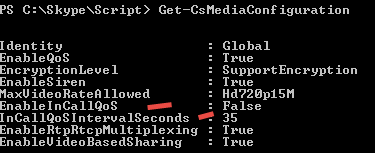
    EnableIncallQoS: attribute enables/disables the ability for Skype for Business clients to send raw data needed to generate IncallQuality messages.

    InCallQoSIntervalSeconds: attribute is used to set the smallest period in which clients will send such raw data, allowing you to throttle messaging so you don’t overburden the network when the stream quality is already impacted. The default value is 35.

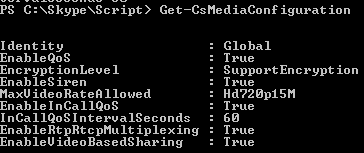
    Activation:

    Set-CsMediaConfiguration -EnableInCallQoS $true -InCallQoSIntervalSeconds 60

    Vérification:

    2/ Activation de la fonctionnalité pour les téléphones.

    Deux possibilités, via l'interface web ou dans le fichier ini.

    Activation dans l'interface web:

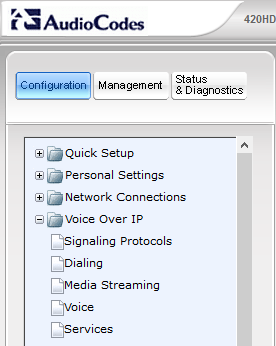
    Naviguer dans Configuration > Voice over IP > Media Streaming).

    Mettre le paramètre RTCP-XR Voice Quality Statistics Mode a la valeur "Remote and Events"

    Activation dans le fichier ini:

    Paramètre: [voip/rtcp_xr/vq_statistics/mode]

    Valeur:

    [0] Disable

    [1] Enable (default)

    3/ Vérification des rapports

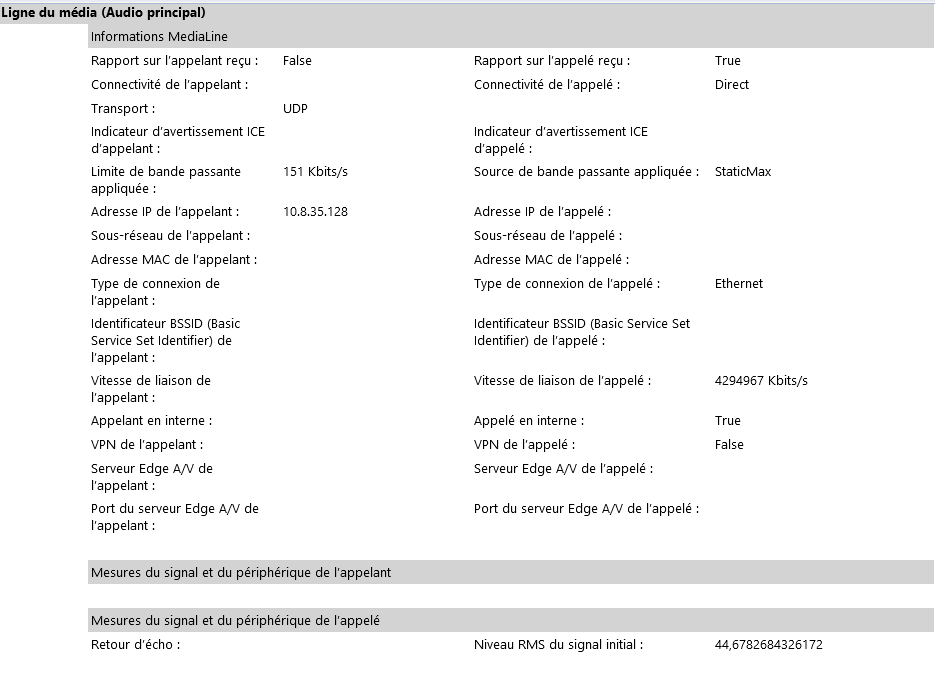
    Avant activation

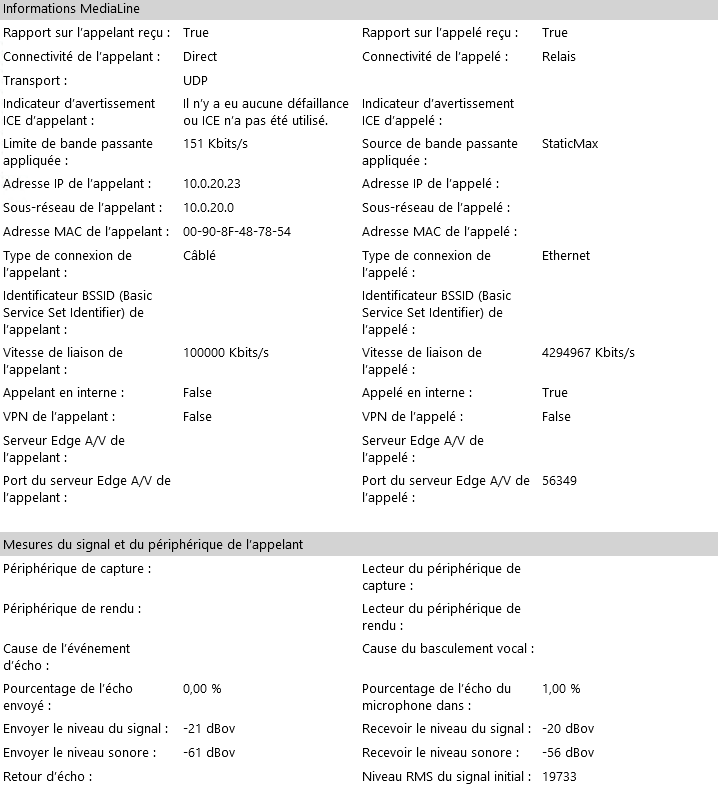
    Aprés activation

  • [Skype for Business] AudioCodes Mediant CCE Appliance Software Version 2.1.0

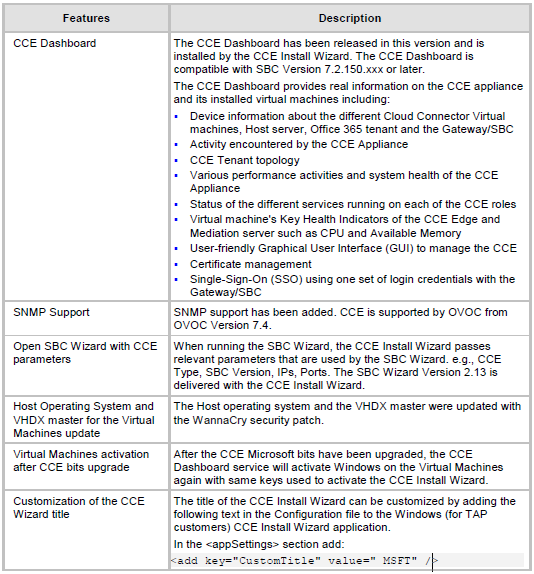
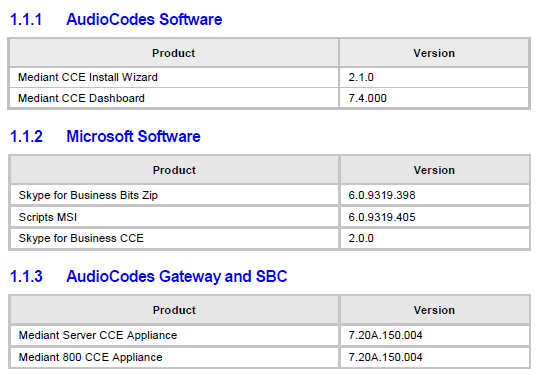
    Audiocodes a rendu disponible une nouvelle version du Mediant CCE Appliance Software en version 2.1.0.

    Cette mise a jour comprend le Microsoft Cloud Connector Edition en version 2.0.1

    Téléchargement releases notes: http://www.audiocodes.com/downloads

    Nouvelles fonctionnalités:

    Logiciels:

    Compatibilité:

    Mediant 800 CCE Appliance

    Mediant Server CCE Appliance

  • [Skype for Business] Sonus SBC firmware version 5.0.8

    Sonus a rendu disponible le 15 août une nouvelle version firmware SBC 1000-2000.

    Version: 5.0.8.

    Lien d'information: https://support.sonus.net/display/UXDOC50/SBC+Edge+5.0.8+Release+Notes

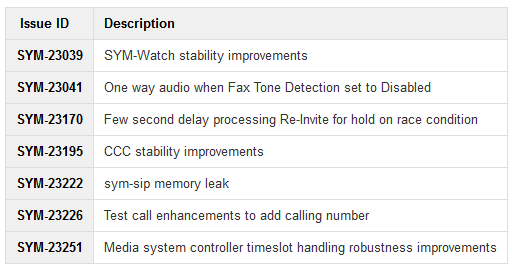
    Mises a jours et fixes:

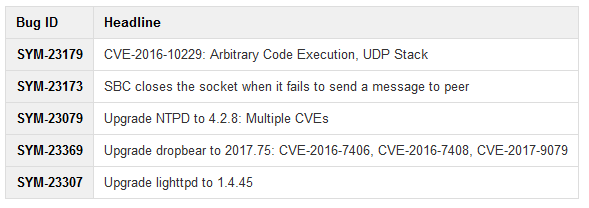
    Mises a jours de sécurité et fixes:

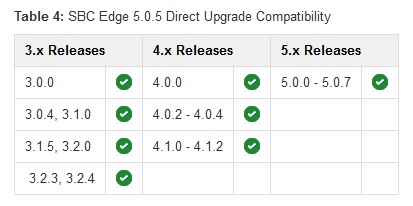
    Tableau de compatibilité pour une mise a jour directe vers 5.0.8.

  • [Skype for Business] Cloud Connector Edition 2.0.1

    Cloud Connector Edition 2.0.1 est maintenant disponible.

    Cette version corrige les problemes suivants:

    • Restarting Virtual Machines sometimes caused the service to stop if the restart order determined by Hyper-V was incorrect. This has been fixed.

    • Calls for download security checks in remote PowerShell sometimes caused calls to the New-CsOnlineSession cmdlet to fail. This issue has been fixed.

    • During automatic updates, switching to a new version sometimes caused the running version to fail. This issue has been fixed.

    Informations ici: What's new in release 2.0 and 2.0.1

  • [Skype for Business] Mise a jour du client Skype for Business 2015 pour Mac- Aout 2017

    Microsoft vient de publier une nouvelle mise à jour du client Skype for Business 2015 pour Mac

    Version: 16.9.0.37

    Lien téléchargement: https://www.microsoft.com/en-us/download/details.aspx?id=54108&ranMID=24542&ranEAID=TnL5HPStwNw&ranSiteID=TnL5HPStwNw-q0haa_QSQ6VN2LH6dk3VxA&tduid=(4718a0708e1332e66fd9bb3ac08283c2)(256380)(2459594)(TnL5HPStwNw-q0haa_QSQ6VN2LH6dk3VxA)()

    Date: 02/08/2017

    Informations: https://support.office.com/en-gb/article/What-s-new-in-Skype-for-Business-2016-cece9f93-add1-4d93-9a38-56cc598e5781?ui=en-US&rs=en-GB&ad=GB#OS_Type=Mac 

    Nouveautés:

    - .Skype for Business on Mac now supports multiple emergency numbers when configured by your admin.


    - Delegates can schedule meetings on behalf of delegators

    Outlook for Mac will now allow a delegate to schedule an online meeting on behalf of a delegator. This new feature has a limitation that the online meeting is created using meeting ID and policies of the delegate, not the delegator. This limitation will be removed in future versions of Skype for Business on Mac and Outlook for Mac.

    Note: You must install the Outlook update version 15.36.170702 or later to enable this feature.
    Delegator and delegate features for Lync Server 2013

    - Delegator and delegate feature are enabled for Lync Server 2013 Cumulative Update 9: July 2017.

        Users can now add delegates to "My Delegates" group in contact group and set call routing preferences to delegates.

        Delegates can see who has made them a delegate.

        Delegates can make calls on behalf of a delegator.

    - Contact management for Lync Server 2013

    The ability to add and remove contacts and create and delete contact groups is enabled for Lync Server 2013 Cumulative Update 9: July 2017.
    Peer-to-Peer desktop sharing with Skype for Business 2016 users for Lync Server 2013

    - Peer-to-peer desktop sharing between Skype for Business on Mac and Skype for Business 2016 on Windows is enabled for Lync Server 2013 Cumulative Update 9: July 2017.

    Améliorations:

    • Increased the touch bar buttons size and spacing when in a meeting.

    • Fixed an issue that prevented all dial-in numbers from being displayed when scheduling an online meeting in Outlook.

    • Fixed an issue where hanging up from a meeting while sharing a PowerPoint presentation ended the presentation for everyone in the meeting.

    • Fixed an issue where the user could be automatically signed in even when Keep me signed in is unchecked.

    • Fixed accessibility issues with keyboard navigation in the Calls and Meetings tabs.

    • Fixed an issue where a user could not see screen sharing if two users tried to start sharing at the same time.

    • Fixed an issue where some check boxes were not displayed correctly in right-to-left languages.

    • Fixed an issue where an error message was not displayed when the Exchange password was needed.

    • Fixed a crash issue when the user maximizes, unmaximizes, and then moves the window while viewing screen sharing in a meeting.

  • [Skype for Business] Mettre a niveau le firmware d'un Sonus SBC 1000/2000

    Le maintien en condition opérationnel du système d'Informations  est un enjeu de tous les jours pour une organisation.

    Ce blog aborde la mise a niveau d'une passerelle Sonus SBC 1000/2000 sans ASM.

    Informations constructeur ici: https://support.sonus.net/display/UXDOC50/Upgrading+Sonus+SBC+1000-2000

    Deux options sont possibles pour la mise a niveau:

    - Mise a jour en une seule étape (option 3a de ce blog);

    - Mise a jour en utilisant la partition inactive (option 3b de ce blog);

    1- Téléchargement du micrologiciel

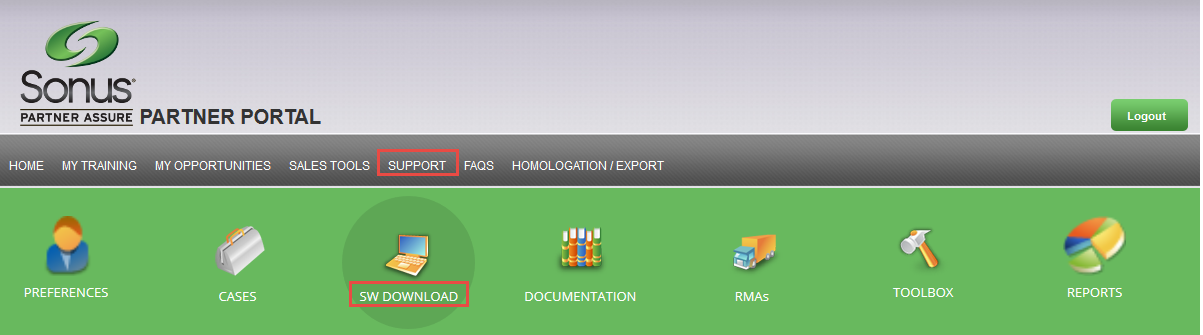
    Depuis le portail sonus (http://www.sonus.net/en/channel-portal-login), procéder à la demande d'accès au téléchargement de la version de mise à niveau souhaitée.

    Naviguer vers l'onglet Support puis SW Download:

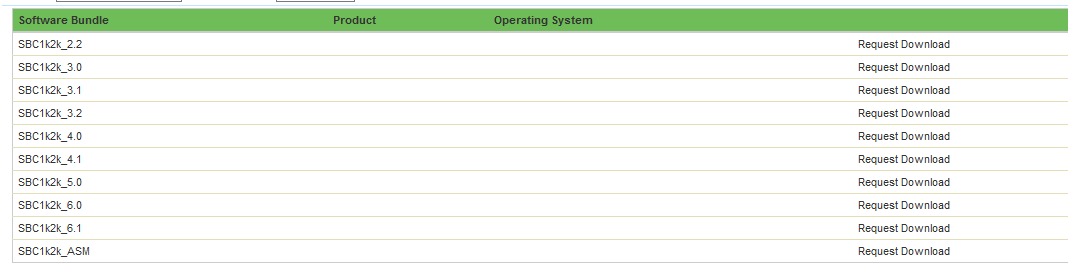
    Sélectionner le produit.

    Puis choisir "Request Download" pour la version de firmware souhaitée.

    Apres un temps assez court, vous devriez recevoir la confirmation d'acces par courriel

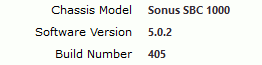
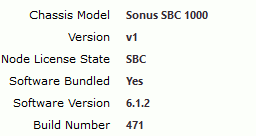
    2/ Vérification de la version de firmware existant sur la passerelle

    Naviguer vers l'onglet System puis Overview:

    Vérifier la version actuelle:

    3a/ Mise à niveau du micrologiciel pour le scénario "One-Step Upgrade"

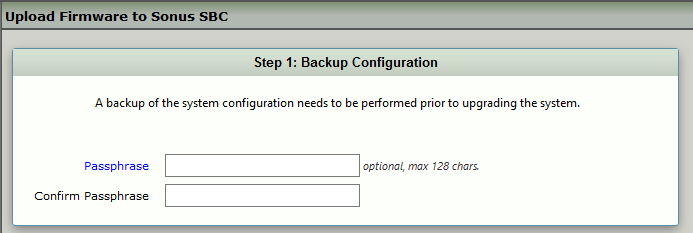
    Naviguer vers l'onglet Task, System > Firmware Upgrade:

    Dans Tasks, Firmware upgrade, il est nécessaire de faire un backup avant de procéder à la mise à niveau:

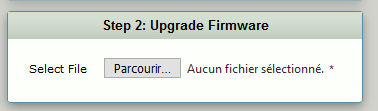
    Une fois complété:

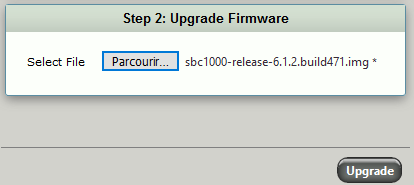
    Sélectionner le fichier de firmware téléchargé lors de votre requête auprès de Sonus.

    Une fois sélectionné, cliquer sur Upgrade.

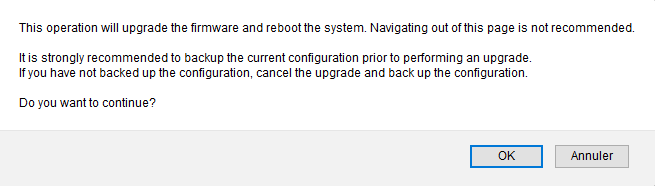
    Le processus en 5 étapes commence après confirmation.

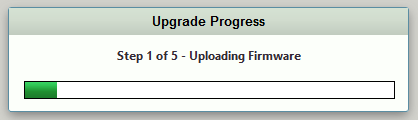
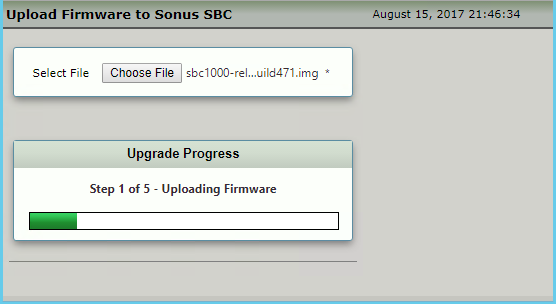
    Upload du firmware:

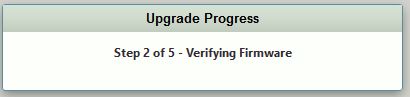
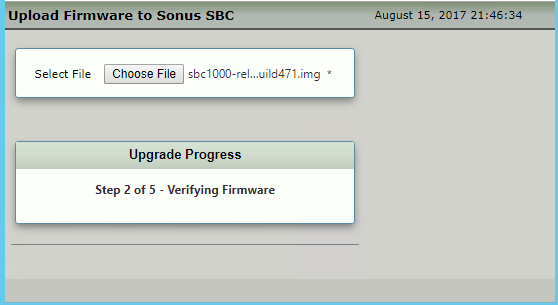
    Validation du firmware:

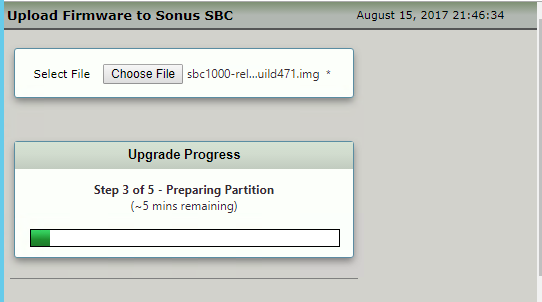
    Préparation de la partition:

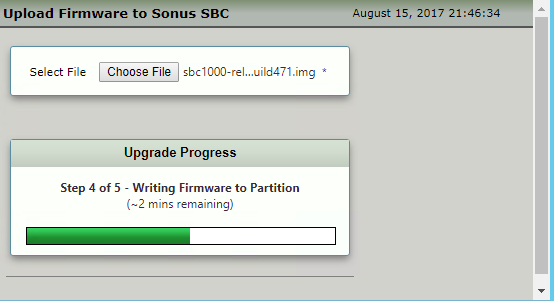
    Écriture du firmware dans la partition:

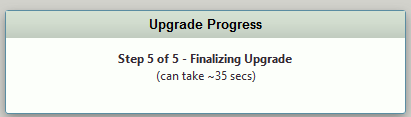
    Finalisation:

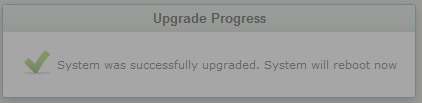
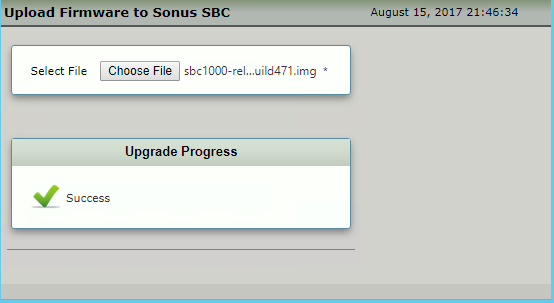
    Le succès de l'opération est confirmé:

    Dans ce mode, le redémarrage est automatique.

    3b/ Mise à niveau du micrologiciel pour le scénario "Upgrading the Inactive Partition"

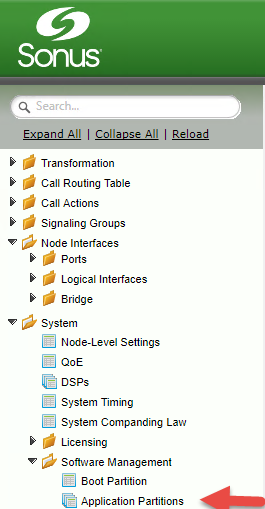
    Naviguer vers l'onglet Settings, System > Software Management > Application Partitions

    Vérifier la version du firmware dans la partition inactive.

    Importer le nouveau firmware dans la partition inactive.

    Import en cours

    Validation du firmware:

    Préparation de la partition.

    Écriture du firmware dans la partition:

    Finalisation de la mise a niveau.

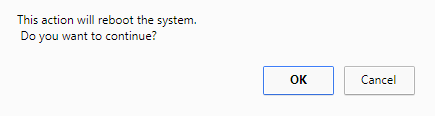
    La nouvelle version de mise a jour nécessite une activation de la partition. Une fois activée, la passerelle nécessite un redémarrage. Les configurations sont préservés.

    Cliquer sur "Set Active" pour lancer le processus.

    Validation requise.

    4/ Vérifier le niveau de firmware de la passerelle

    Dès le retour en activité de la passerelle, vérifiez la version du micrologiciel:

  • [Skype for Business] Audiocodes Mediant: Configurer une musique d'attente

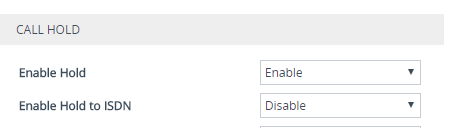
    1/ Activation de la gestion de la musique d'attention

    Naviguer dans Setup menu > Signaling & Media tab > Gateway folder > DTMF & Supplementary > Supplementary Services Settings

    ENABLE HOLD: Enables interworking of the Hold/Retrieve supplementary service from PRI to SIP
    For digital interfaces: To support interworking of the Hold/Retrieve supplementary service from SIP to ISDN (for QSIG and Euro ISDN), set the parameter EnableHold2ISDN to 1 [ENABLE]
    Enable Hold to ISDN: Enables SIP-to-ISDN interworking of the Hold/Retrieve supplementary service.
    If the parameter is disabled, the device plays a Held tone to the Tel side when a SIP request with 0.0.0.0 or "inactive" in SDP is received. An appropriate CPT file with the Held tone should be used.

    2/ Création d'un fichier Prerecorded Tone

    Prerecorded Tone (PRT) est un fichier .dat contenant un ensemble de tonalités préenregistrées pouvant être lues par le périphérique et utilisé par exemple pour jouer de la musique (MoH) à une personne appelée qui a été mise en attente. Jusqu'à 40 tonalités (totalisant environ 10 minutes) peuvent être stockées dans un seul fichier PRT sur la mémoire flash de l'appareil. La lecture de tonalités à partir d'un fichier PRT est prise en charge pour les appels Gateway et SBC.

    Si le codec de la tonalité est le même que celui utilisé dans l'appel en cours, aucun DSP n'est requis lorsque le MoH est en fonction, dans le scénario ou les codecs différes, l'utilisation de DSP est requis.

    Les tonalités préenregistrées peuvent être créées en utilisant des utilitaires d'enregistrement tiers standard, tels que Adobe Audition ou WavePad Sound Editor, puis combinés en un seul fichier (fichier PRT) à l'aide de l'utilitaire AudioCodes DConvert.

    WavePad Sound Editor est téléchargeable ici:

    http://www.nch.com.au/components/wpsetup.exe

    Importer votre fichier audio original dans l'application WavePad Sound Editor

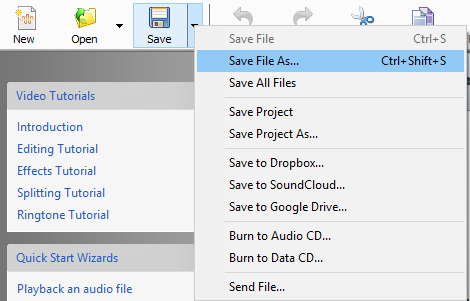
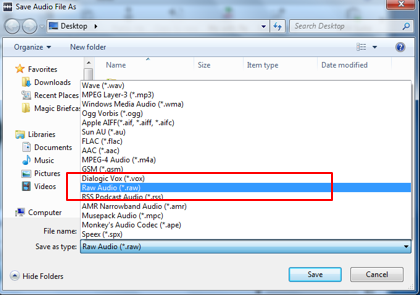
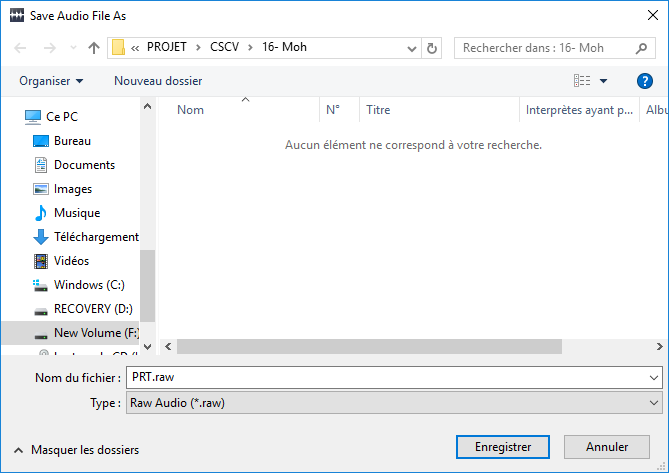
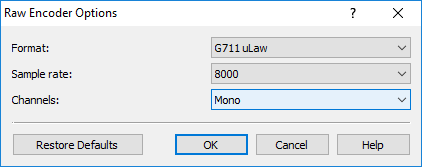
    Sauvegarder le fichier sous un format Raw

    puis

    Le fichier au format raw doit répondre aux exigences suivantes:

    Le fichier doit répondre aux exigences suivantes:

    - Coders: G.711 A-law or G.711 μ-law (and other coders)
    - Rate: 8 kHz
    - Resolution: 8-bit
    - Channels: mono

    Lancer l'application Audiocodes TrunkPack Downloadable Conversion Utility (DCONVERT).

    Choisir Process Prerecorded Tone File(s).

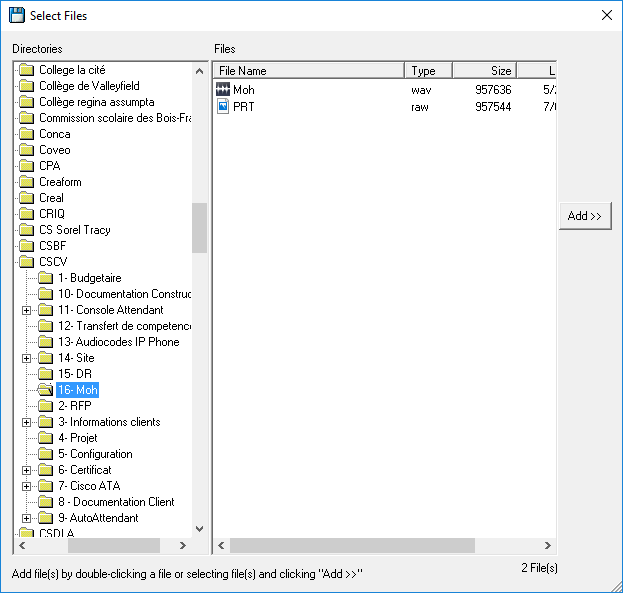
    Ajouter le fichier au format Raw précédemment créé

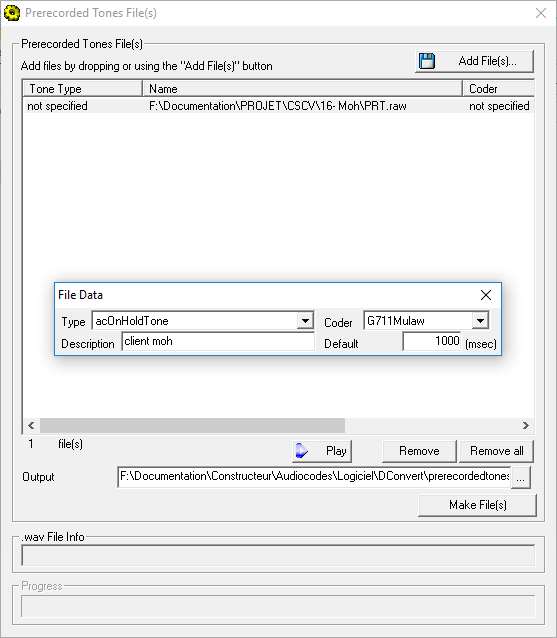
    Pour chaque fichier au format Raw importé, définir le type de tonalité, le codec, la durée par défaut.

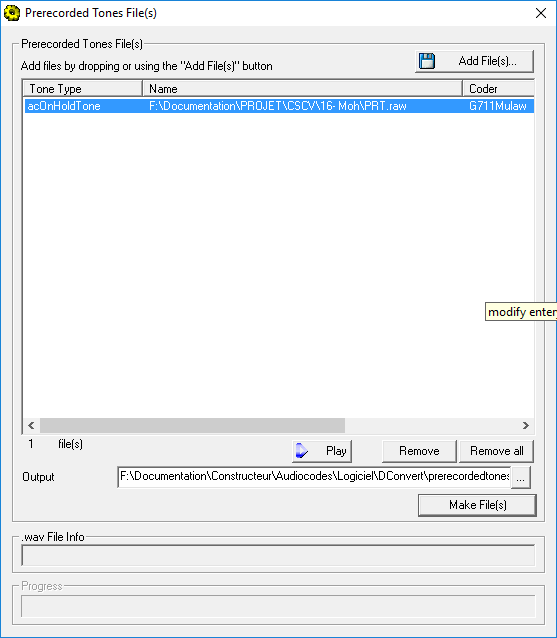
    Choisir l'option "Make File" pour convertir le fichier en .dat

    3/ Importation du fichier PRT sur la passerelle Audiocodes Mediant par l'interface web

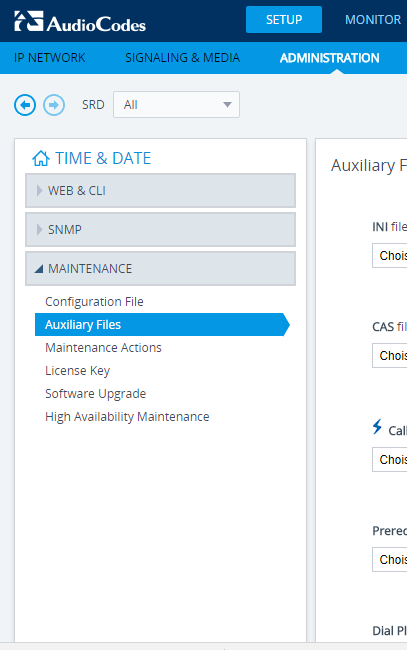
    Naviguer vers Setup menu > Administration tab > Maintenance folder > Auxiliary Files

    Importer le fichier:

    Vous devriez observer la confirmation suivante:

  • [Skype for Business] Polycom Better Together over Ethernet Connector 3.6.0 disponible

    Polycom a rendu disponible le 31 juillet 2017 une nouvelle version de son application btoe.

    Version: 3.6

    Téléchargement: http://support.polycom.com/content/support/North_America/USA/en/eula/ucs/uc-agreement-btoe-3-6-0.html

    Nouveautés:

    Aucune

    Fix:

    OS supportés:

    - Microsoft® Windows 10
    - Microsoft® Windows 8.1
    - Microsoft® Windows 8
    - Microsoft® Windows 7
    - Microsoft® Windows Vista

    Modèles supportés:

    - Polycom VVX 201 business media phones
    - Polycom VVX 300, 301, 310, and 311 business media phones
    - Polycom VVX 400, 401, 410, and 411 business media phones
    - Polycom VVX 500 and 501 business media phones
    - Polycom VVX 600 and 601 business media phones

  • [Skype for Business] Mise a jour pour le client Skype for Business 2015 (Lync 2013) - KB4011046 - Aout 2017

    Microsoft vient de publier une nouvelle mise à jour pour le client Skype for Business 2015 (Lync 2013).

    KB: 4011046

    Lien: https://support.microsoft.com/en-us/help/4011046/august-1-2017-update-for-skype-for-business-2015-lync-2013-kb4011046

    Date: 01/08/2017 

    Numéro de version:  15.0.4953.1000

    Téléchargement:

    32-bit: Download the 32-bit Lync update package now.

    64-bit: Download the 64-bit Lync update package now.

    Prérequis:

    Avant de procéder, vous devez installer ces mises a jours:

    Corrections:

  • [Skype for Business] Nouveautés pour les réceptions automatisées et files d'appels Cloud PBX

    Microsoft annonce les nouveautés pour les réceptions automatisées et files d'appels Cloud PBX pour maintenant (GA Juillet 2017)

    Users can now receive Auto Attendants and Call Queues calls on Mac, iPhone, iPad and Android Skype for Business clients;
    Admins can now use 0365 Groups (both public and private) to limit the scope of users reachable with Dial by Name feature in Auto Attendants.
    The maximum size of the name list supported for name recognition with Speech has been increased from 50,000 to 80,000 users in Auto Attendants.
    Improved accuracy of recognition for similar-sounding names for name recognition with Speech in Dial by Name feature of Auto Attendant.
    To protect user anonymity,  Admins can now use PowerShell to enable users to make outbound calls on behalf of an Auto Attendant or Call Queue using a policy called CallingLineIdentity (also called a Calling Line ID);
    Auto Attendant has been updated with an enhanced English (US) Text to Speech voice in July, 2017.

    Informations ici: https://techcommunity.microsoft.com/t5/Skype-for-Business-Blog/What-s-new-for-Auto-Attendants-and-Call-Queues-in-July-2017/ba-p/91878?q=_change_me_

  • [Skype for Business] Preview Voicemail User Settings disponibile

    Si vous souhaitez essayer les nouvelles fonctionnalités inclus dans le preview Voicemail User Settings, l'inscription est disponible ici: https://www.skypepreview.com/

    Le preview comprend les fonctionnalités suivantes:

    Voicemail user-settings is a web portal that gives Cloud PBX users control of their voicemail preferences using virtually any standard browser. Entry-point into the portal will be available in most Skype for Business Apps, as well as in the voicemail email body. The portal will authenticate users using their corporate credentials. Currently, users will be able to:

    • Deactivate Voicemail: disable messages temporarily or permanently for users that prefer not to receive voicemail messages
    • Change Prompt Language: change the language of the prompts played to callers, as well as the language in which their messages will be transcribed in
    • Customized OOF greeting: play a different greeting message to callers while out of office
    Requirements
    • User’s Skype for Business App need to be upgraded to redirect “Set Up my Voicemail” Entry-point toward the portal URL. They will still be able to reach the user-setting portal directly from the browser or the email entry-point.

  • [Skype for Business] Pexip Infinity Fusion certifié comme solution interopérable avec Microsoft Skype for Business Server

    Pexip Infinity Fusion a annoncé aujourd'hui être certifié comme solution interopérable avec  Microsoft Skype for Business Server.

    Les versions supportées commencent a partir de 15.1.

    Revue ici: https://www.pexip.com/article/press-release/pexip-infinity-fusion-certified-interoperability-solution-microsoft-skype

  • [Skype for Business] Polycom UC Software 5.6

    Polycom a publier pour le mois de Juillet 2017 une nouvelle révision pour le software Polycom UC en version 5.6

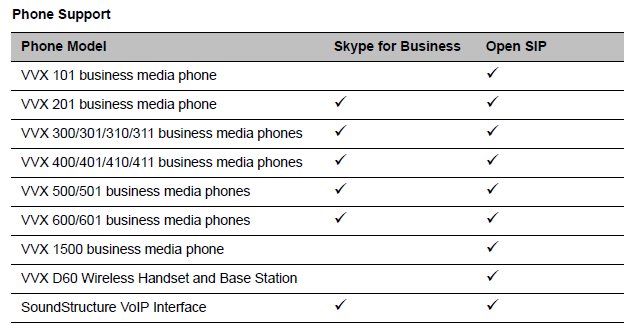
    La révision pour Skype Entreprise s'applique aux téléphones suivants:

    Polycom® VVX® 201 business media phones
    Polycom® VVX® 300/301/310/311 business media phones
    Polycom® VVX® 400/401/410/411 business media phones
    Polycom® VVX® 500/501 business media phones
    Polycom® VVX® 600/601 business media phones
    Polycom® SoundStructure® VoIP Interface

    La révision comporte les nouveautés et améliorations communiquées dans la releases notes suivantes:: http://support.polycom.com/content/dam/polycom-support/products/Voice/business_media_phones/release-notes/en/uc-software-release-notes-5-6-0.pdf

    Informations ici: http://support.polycom.com/content/support/North_America/USA/en/support/voice/polycom_uc/polycom_uc_software_release.html#5.6.0

    Télécharger fichier cab: http://support.polycom.com/content/support/North_America/USA/en/eula/ucs/ucagreement-5-6-0-cab.html

    5.5.2 Combined: http://support.polycom.com/content/support/North_America/USA/en/eula/ucs/ucagreement-5-6-0-combined.html

    5.5.2 Split: http://support.polycom.com/content/support/North_America/USA/en/eula/ucs/ucagreement-5-6-0-split.html

    Polycom Btoe 3.5.0: http://support.polycom.com/content/support/North_America/USA/en/eula/ucs/uc-agreement-btoe-3-5-0.html

  • [Exchange UM] Audiocodes X-UM

    Comme annoncé ici: http://microsofttouch.fr/default/b/christophe/posts/exchange-um-fin-du-support-des-sbc-avec-exchange-um-online , Microsoft ne supportera plus les ipbx/pbx connectés via des SBC aux services Exchange UM Online a partir de Juillet 2018.

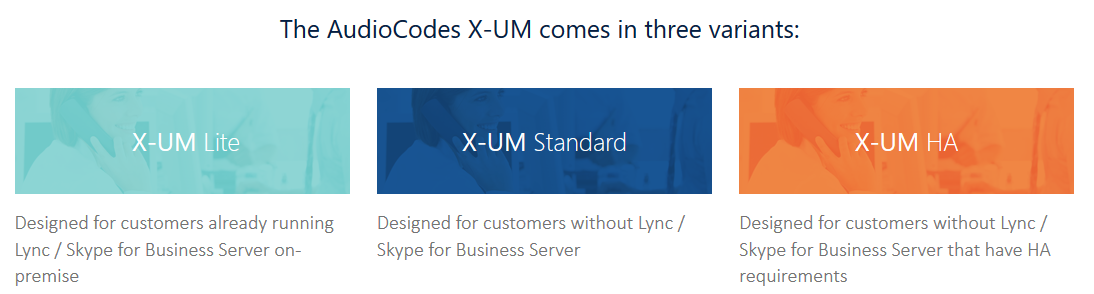
    Audiocodes semble aujourd'hui lancer une possible solution pour les organisations impactées par cette annonce: Audiocodes X-UM

    Informations ici : http://online.audiocodes.com/exchange-online-unified-messaging-x-um

    La solution propose 3 options, je n'ai pas encore plus d'informations, mais très bientôt.

  • [Skype for Business] Cloud Connector Edition version 2.0

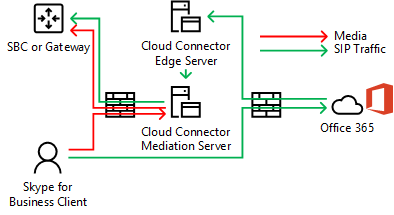
    Microsoft a rendu disponible depuis aujourd'hui Cloud Connector Edition en version 2.0.

    Les fonctionnalités suivantes sont disponibles:

    - Support du Media Bypass
    - Support of 16 Cloud Connector Editions per one PSTN Site
    - Ability to manipulate SIP headers for billing or interoperability purposes
    - Use of Office 365 Skype for Business account instead of a Global Administrator account
    - Autogenerated passwords for local administrators of Cloud Connector instances
    - Introduction of Hybrid Voice flag in Mediation Service User Agent to better distinguish Cloud Connector calls in the Call Quality Dashboard
    - Improvements to self-monitoring and self-troubleshooting process
    - Disabling SSL 3.0 by default for all services used by Cloud Connector Edition

    Plus d'informations ici: https://techcommunity.microsoft.com/t5/Skype-for-Business-Blog/Announcing-Skype-For-Business-Cloud-Connector-Edition-version-2/ba-p/88488#.WW-kkoDySRA.twitter

    Cette version était tres attendu!

  • [Exchange UM] Fin du support des SBC avec Exchange UM Online

    Microsoft vient d'annoncer officiellement ne plus supporter les ipbx/pbx connectés via des SBC aux services Exchange UM Online a partir de Juillet 2018.

    https://blogs.technet.microsoft.com/exchange/2017/07/18/discontinuation-of-support-for-session-border-controllers-in-exchange-online-unified-messaging/

    https://techcommunity.microsoft.com/t5/Exchange/Discontinuation-of-support-for-Session-Border-Controllers-in/m-p/88636

    https://techcommunity.microsoft.com/t5/Exchange/bd-p/Exchange_General

    Ceci est une annonce ayant une incidence important pour les organisations utilisant ces services, et malgré le contenu de l'annonce précisant que cela affecte seulement une poignée de compagnie, cette fin de support impact du monde, des tres grandes entreprises qui ont tout juste un an pour ce réorienter.

    Les 4 options suivantes sont présentées:

    Option 1: Complete migration from 3rd party on-premises PBX to Office 365 Cloud PBX.
    Option 2: Complete migration from 3rd party on-premises PBX to Skype for Business Server Enterprise Voice on-premises.
    Option 3: For customers with a mixed deployment of 3rd party PBX and Skype for Business, connect the PBX to Skype for Business Server using a connector from a Microsoft partner, and continue using Exchange Online UM through that connector. For example, TE-SYSTEMS’ anynode UM connector can be used for that purpose.
    Option 4: For customers with no Skype for Business Server deployment or for whom the solutions above are not appropriate, implement a 3rd party voicemail system.

    L'option 1 et 2, dépendamment des investissements en cours avec la téléphonie principale, la taille de l'organisation, la volonté d'une direction vers la technologie, les budgets, le niveau de confort des équipes en internes, les dépendances existantes en moins d'un an, semble une voie difficile.

    Option 3 nécessite que l'organisation possede un environnement Skype Entreprise localement, la solution présentée dans l'annonce est celle de Anynode: http://www.anynode.de/voicemail/

    J'ai eu des échanges avec d'autres manufacturiers qui semble aussi travailler sur une alternative envisageable, mais des interrogations demeures, les licences MS nécessaires dans ce scénario, le support par Microsoft de ces solutions, et par dessus cela, l'avenir de la technologie Exchange UM Online dont les fonctionnalités migrent vers Azure VoiceMail

     L'option 4 va permettre aux concurrents de Microsoft, ayant perdu par exemple le controle de la messagerie vocale et des réceptions automatisées (et tres possiblement, du client de collaboration) de reprendre le terrain dans l'organisation

    Au vue des délais, des choix tres rapides pour les organisations impactées devront être prises.


    A suivre, cela m'impacte aussi directement pour certains de mes clients...

  • [Skype for Business] Fin de support pour les firmware Sonus SBC 1000 et 2000 en release R4

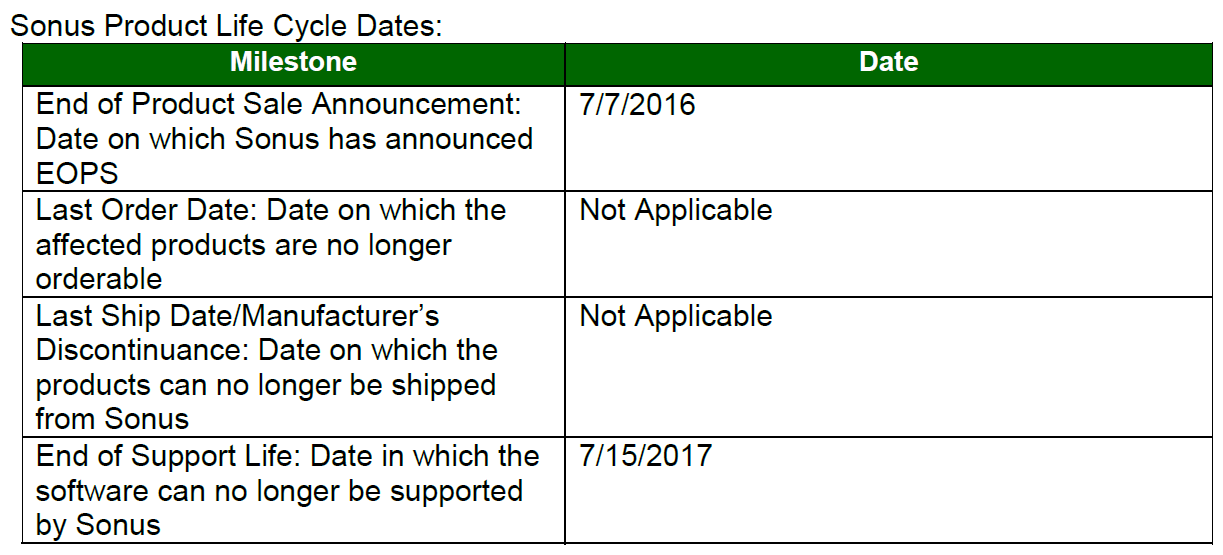
    Annoncé l'été dernier, les les firmware Sonus SBC 1000 et 2000 en release R4 ne seront plus supportés a partir de demain (15 juillet 2017)

    Pour continuer a bénéficier du support, vous devez donc mettre a niveaux vos passerelles vers les release 5 ou 6.

    La notice EOPS est en attachement via ce post

  • [Skype for Business] AudioCodes annonce la solution CCE Hub pour les environnements Microsoft Cloud PBX

    AudioCodes annonce la solution CCE Hub pour les environnements Microsoft Cloud PBX

    Description:

    - AudioCodes CCE Hub solution introduces enhanced flexibility for centralized Microsoft Cloud Connector Edition (CCE) deployments at datacenters
    - Reduction of voice infrastructure is made possible by eliminating the need to deploy CCE at branch offices
    - The solution delivers simplified, reliable voice connectivity for multi-site enterprise or managed service provider Cloud PBX environments
    - Terminating Microsoft SILK voice coder on AudioCodes SBC and gateways reduces bandwidth while preserving voice quality
    - CCE Hub solution components include:
           -  AudioCodes SBCs and media gateways delivering high quality voice connectivity with PSTN, SIP trunks and existing PBXs and IP-PBXs
            - AudioCodes Routing Manager delivering flexible, centrally managed call routing
            - Simple installation wizard ensuring accelerated and simplified deployment
            - Centralized administration and alarm management helping to reduce operational expenses
            - Intuitive dashboard for simplified CCE provisioning and admin tasks

    Information press ici: http://www.audiocodes.com/press-releases/audiocodes-announces-cce-hub-solution-for-microsoft-cloud-pbx-environments?utm_content=57262157

    Information produit: http://www.audiocodes.com/solutions/cce-hub

  • [Skype for Business] Nouveau firmware pour les passerelles AudioCodes SBC & Gateway Series: Version 7.2.150

    Depuis le 20 juin est disponible pour les passerelles AudioCodes SBC & Gateway Series un nouveau firmware en version 7.2.150.

    Les principales nouveautés sont les suivantes:

    Mediant 9000 session capacity increase to 50,000 sessions (from 24,000)
    Mediant 9000 can now be ordered with a four 10GE and eight 1GE interfaces
    Mediant 800 session capacity increase to 400 sessions (from 250)
    Mediant Virtual Edi on SBC running on KVM with SR‐IOV reaches 24,000 sessions
    First major 7.2 version for MSBR por olio to align features with SBC/GWw ith density change only
    Mediant 500L now supports analog interfaces (up to four FXS and FXO ports)
    SBC Configura on Wizard is integrated in the Web GUI, allowing fast SBC configura on using pre‐tested interoperability templates
    SBC updates presence (e.g., busy) of non‐Skype for Business clients in Skype for Business environments
    Pulse dialing support on MP‐1288
    Local storage of logs on Mediant 9000 and Mediant VE

    La liste complète est disponible dans la release notes SBC‐Gateway‐MSBR Series Release Notes Ver. 7.2.

    On observe dans la liste l'ajout de la capacité d'offrir une gestion de présence pour les clients non Skype Entreprise:

    This feature provides support for the device to notify the Microsoft Skype for Business Server of the presence status ("on-the-phone") of Skype for Business users when making and receiving calls using third-party (non-Skype for Business) endpoint devices (such as mobile phones and PBX phones). Up until now, presence status was handled solely by the Skype for Business Server to reflect calls between Skype for Business endpoints only (e.g., Skype for Business desktop clients).
    The device uses SIP PUBLISH messages to update the Skype for Business Server of presence status changes. The Skype for Business Server then publishes the presence status to all the Skype for Business users, which is displayed on their native Skype for Business endpoints.

    Téléchargement ici: http://www.audiocodes.com/downloads/solutions